


Users are advised to uninstall QuickTime for Windows immediately
Two critical security vulnerabilities affecting QuickTime for Windows were discovered
Due to the discovery of two critical security vulnerabilities that would not be patched, users of QuickTime player for Windows are advised to uninstall the program as soon as possible.
Apple has ended the support for QuickTime for Windows and will not provide patches for the security vulnerabilities for the said software on the Windows platform. As such, users are strongly recommended to uninstall QuickTime to protect personal computers from possible exploits.
Please note that this does not apply to QuickTime on Mac OSX.
Here are the steps to uninstall QuickTime from your Windows computer:
For Windows 7:
- Press the “Start button”.
- Select “Control Panel”.
- Choose “Programs and features”.
- Find QuickTime in the list of programs, and select “Uninstall”.
For more information about the security vulnerabilities associated with QuickTime, please visit the following link: http://zerodayinitiative.com/advisories/ZDI-16-241/
If you have any further queries, please feel free to contact our Help Desk.
Help Desk
Location : Room 2085, 2/F, Central Teaching Building (E5), eMap
Telephone : 8822 8600
Email : @
Information and Communication Technology Office
Friendly Reminder: Beware of Phishing Emails and Ransomware
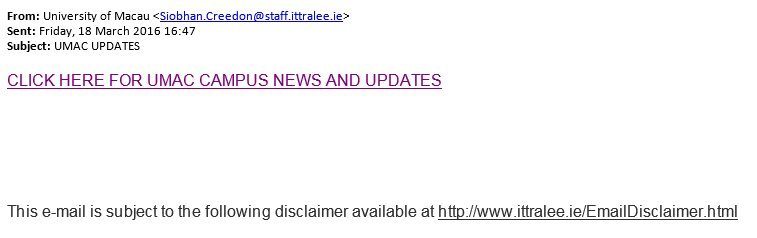
Sample of Phishing Email
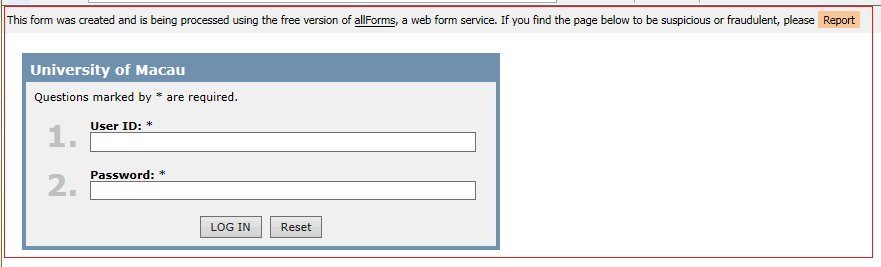
Sample of Phishing Website
Dear Users,
You may have received email similar to the above phishing email, which seems to be sent by ICTO.
Please DO NOT RESPOND to this kind of emails which purposely asking for your user name and password. ICTO will NOT ask you for these information through email or web page.
In addition, many Ransomware have been spreading quickly through massive spam campaigns and compromised websites. Data will be unrecoverable due to encryption by Ransomware. Therefore, please avoid opening suspicious emails and backup the files on your computer regularly. The following are some known spam title:
- ATTN: Invoice J- [RANDOM NUMBERS]
- Your booking [RANDOM NUMBERS] is confirmed
- Payment ACCEPTED [RANDOM NUMBERS]
- FW: Invoice 2016-M # [RANDOM NUMBER]
If you have any further queries, please feel free to contact our Help Desk.
ICTO Help Desk
Location : Room 2085, 2/F, Central Teaching Building (E5) (eMap)
Telephone : 8822 8600
Email : @
Thanks for your attention.
Information and Communication Technology Office
Please update your NOD32 Anti-virus Software (Home Edition) on or before 15 March, 2016
To: All Users
All staff, undergraduate and postgraduate students of the University of Macau are entitled to install ESET Anti-virus software on one their personally owned computer. Please follow the steps below to get the license and ESET software.
If you have installed ESET software on your personally owned computer before 15 February, 2016, please apply for the new license, otherwise it will expire on 15 March, 2016.
For office computers in campus, the new license will automatically be updated. Users do not need to apply it individually.
License Application and Renewal Procedure
- Visit and log in the web page https://account.icto.um.edu.mo;
- Apply “ESET SMART SECURITY” and click the “Submit” button;
- Then the Serial Number and the related information* will be displayed;
- Please visit the link, input the Serial Number and complete the registration;
- Once the product registration is completed, the system will send an email which contains the Username, Password and Download link to the registered email address;
- Before you update, download and install the ESET Smart Security, please follow the instructions in the FAQ link displayed on the same webpage.
*ESET Smart Security 1 year full version license for all schools’ / universities’ home-use will expire in 365 days after registration.
For more information about NOD 32 and how to update the license, please visit our anti-virus home page for home users and FAQ.
- http://www.umac.mo/icto/antivirus/av_intro.html
- http://www.umac.mo/icto/antivirus/av_home_uplicense.html
- http://faq.icto.um.edu.mo/what-is-the-eset-smart-security-home-user-license-application-and-renewal-procedure/
Should you have any enquiries, please feel free to contact ICTO Help Desk.
Help Desk
Location : Room 2085, 2/F, Central Teaching Building (E5), eMap
Telephone : 8822 8600
Email : @
Information and Communication Technology Office