防範網絡釣魚攻擊的小貼士

防範網絡釣魚攻擊的小貼士

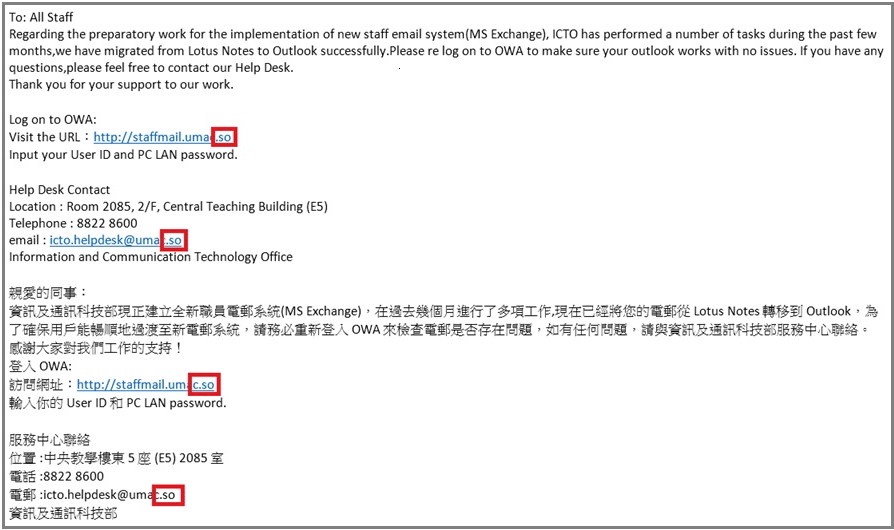
近期的網絡攻擊變得越來越老謀深算和猛烈。我們不斷收到網絡釣魚郵件,有些網絡釣魚郵件仿真度高,有針對性,看起來像一般的正常郵件。類似的事件發生在數天之前,有不少職員以為一網絡釣魚郵件是由 ICTO 發出的正常郵件並回應了郵件上的內容,因而洩露了其帳戶資訊。

通報有關網絡釣魚郵件

為了避免帳戶密碼洩露或墮入類似的網絡攻擊,如果您不確定收到的郵件是否釣魚郵件,請轉發可疑郵件至@ 或者致電資訊及通訊科技部查詢。ICTO將盡一切方法從校內系統上攔截這些網絡釣魚郵件及作出通告,從而防止其他人墮入類似的網絡釣魚攻擊。

回應了網絡釣魚郵件後的補救措施

如果您已經回應了網絡釣魚電子郵件上的內容,請盡快透過以下網址更改您的帳戶密碼: http://www.umac.mo/icto/password_staff.html

如果ICTO發現您的帳戶有可能被黑客非法盜取,我們會暫時停用您的帳戶及儘快為你提供協助,避免損失。

資訊安全講座 (26/08/2015)

為分享更多關於資訊安全的知識,資訊及通訊科技部將在資訊科技週舉辦有關防範網絡釣魚的講座。我們請來了香港NOD32的防毒軟件專家介紹安全使用網絡及電腦的注意事項。我們歡迎您的參與!
主題: 如何避免上釣?
日期: 26/08/2015
上午場: 11:00 – 12:00
下午場: 15:00 – 16:00
地點: 學生活動中心, E31-G019

如有任何疑問,請與我們的服務中心聯絡:

服 務 中 心
位置 : 中央教學樓東5座(E5)2085室 (電子地圖)
電話 : 8822 8600
電郵 : @

資訊及通訊科技部

緊急通知: 提防假冒 ICTO 服務中心發出之釣魚郵件

各位用戶:

您可能會收到一些類似以上的欺詐電郵,這些電郵看起來像是由資訊及通訊科技部發送的。

請勿回應此類查詢您的帳戶名稱及密碼的郵件,資訊及通訊科技部絕對不會要求您以電郵或通過網頁發送這類信息。


Phishing_20150817

如需要協助請聯絡我們的服務中心:

服務中心聯絡
位置 :中央教學樓東5座(E5)2085室
電話 :8822 8600
電郵 :@

資訊及通訊科技部

VeraCrypt – TrueCrypt 的替代加密軟件

正如較早前發佈,TrueCrypt 可能含有未修復的安全問題

目前,已有幾種開源軟件可替代 TrueCrypt,其中之一是加密軟件 VeraCrypt。它提供一個全面的安全問題解決方案。此軟體不僅能夠解決許多 TrueCrypt 中的漏洞和安全問題,而且它還適用於 Windows 、Mac 和 Linux 系統。

VeraCrypt 支援高度安全的 AES 和 Serpent 、Twofish 三種加密演算法以及它們的組合來加密數據。用戶可以使用它來創建加密區或加密磁碟分區和整個磁碟。

資訊及通訊科技部網頁上有提供 Windows 和 Mac 作業系統內建加密工具的使用教學,詳情請參閱: http://www.umac.mo/icto/intranet/security/encrypt_veracrypt_c.html

如有任何疑問,請與我們的服務中心聯絡:

服 務 中 心
位置 : 中央教學樓東5座(E5)2085室 (電子地圖)
電話 : 8822 8600
電郵 : @
資訊及通訊科技部

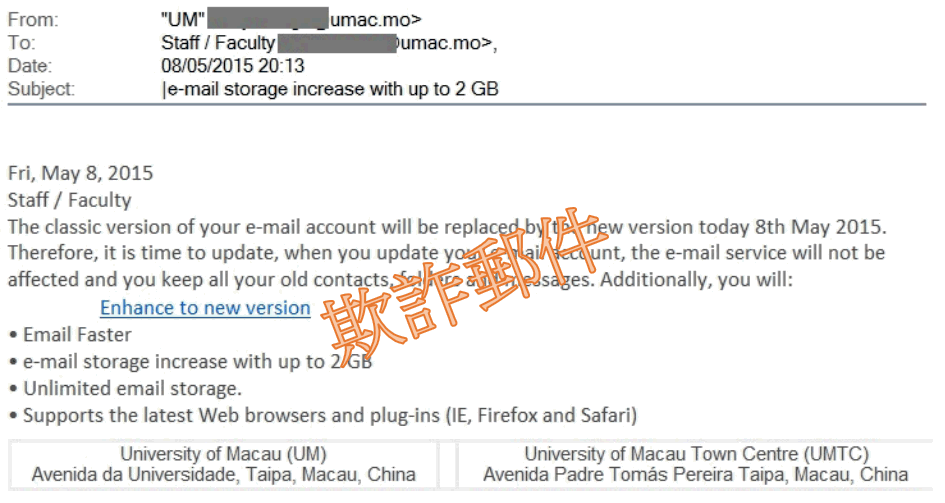
提提您: 請勿回應欺詐郵件

欺詐郵件樣本

欺詐郵件樣本

各位用戶:

您可能會收到一些類似以上的欺詐電郵。這些電郵看起來像是由資訊及通訊科技部發送的。

請勿回應此類查詢您的帳戶名稱及密碼的郵件。資訊及通訊科技部絕對不會要求您以電郵或通過網頁發送這類信息。若您不小心回應了一些可疑郵件,請儘快重設您的帳戶密碼。

如需協助,請聯絡我們的服務中心:

服務中心聯絡
位置 : 中央教學樓東5座 (E5) 2085室
電子地圖 : 電腦版本, 手機版本
電話 : 8822 8600
電郵 : @

資訊及通訊科技部

Please Do Not Respond to Phishing Email (24-Feb-2015)

Dear Users,

You may have received email similar to the above phishing email, which seems to be sent by ICTO.

Please DO NOT RESPOND to this kind of emails which purposely asking for your user name and password. ICTO will NOT ask you for these information through email or web page. If you have responded to the suspicious email accidentally, you are advised to reset your password at once.

If you have any further queries, please feel free to contact our Help Desk (Ext. 8600, Email: @)

Thanks for your attention.

Information and Communication Technology Office

Be aware of the email with suspicious attachment named “A letter of complaint on University of Macau.rar”

To: All Users

Many users reported that they received a suspicious email with password protected attachment named “A letter of complaint on University of Macau.rar”. Please DO NOT OPEN this attachment. This attachment contains a suspected Trojan. Usually, to compress an attachment with password can be used to bypass Anti-virus system. If you open it, your computer may be infected.

If you have any further queries, please feel free to contact our Help Desk (Ext. 8600, Email: @)

Thank your your attention.

Information and Communication Technology Office

Please Do Not Respond to Phishing Email (31-Mar-2015)

Dear Users,

You may have received email similar to the above phishing email, which seems to be sent by ICTO.

Please DO NOT RESPOND to this kind of emails which purposely asking for your user name and password. ICTO will NOT ask you for these information through email or web page. If you have responded to the suspicious email accidentally, you are advised to reset your password at once.

If you have any further queries, please feel free to contact our Help Desk (Ext. 8600, Email: @)

Thanks for your attention.

Information and Communication Technology Office

Critical Security Notice for OpenSSL Heartbleed Vulnerability

To All Users,

The US Computer Emergency Readiness Team (US-CERT) have issued warnings on the vulnerability that found in OpenSSL versions 1.0.1 through 1.0.1f, and version 1.0.2-beta including version 1.0.2-beta1.


Original release date

8 April 2014

Description

This vulnerability allows remote hackers to retrieve sensitive information without authentication through incorrect memory handling in the TLS heartbeat extension. User authentication credentials and secret keys may then be disclosed to hackers.

The sensitive information that may be retrieved using this vulnerability include:

  • Primary key material (secret keys)
  • Secondary key material (user names and passwords used by vulnerable services)
  • Protected content (sensitive data used by vulnerable services)
  • Collateral (memory addresses and content that can be leveraged to bypass exploit mitigations)


Systems Affected

  • OpenSSL 1.0.1 through 1.0.1f
  • OpenSSL 1.0.2-beta (including 1.0.2-beta1)


Solution

Step 1: You can check if your web server is affected by this vulnerability through https://www.ssllabs.com/ssltest/.  A warning as show below will be displayed if the webserver is affected:

cid:image001.png@01CF54B3.62800530

Step 2: OpenSSL has released the latest patches to address this vulnerability, you can download the patched update fromhttps://www.openssl.org/source/.

  • For OpenSSL version 1.0.1 (including 1.0.1f): Update to version 1.0.1g
  • For OpenSSL version 1.0.2-beta (including 1.0.2-beta1) : To be fixed in version 1.0.2-beta2.  Users unable to immediately upgrade can alternatively recompile OpenSSL with -DOPENSSL_NO_HEARTBEATS .
  • Details: https://www.openssl.org/news/secadv/20140407.txt

Step 3: Any keys generated with a vulnerable version of OpenSSL should be considered compromised, they should be regenerated and deployed after the patch has been applied.


References


Thank you for your attention. For further inquiries, please feel free to contact our Help Desk (Ext. 8600, Email: @).

Information and Communication Technology Office

 

Important System Security Update for Shellshock

To All Users,

Please be informed that a high security vulnerability in UNIX Bash shell (Shellshock, also known as Bashdoor) was
disclosed on 24 Sept. 2014, which would eventually let remote attackers bypass system authentication and execute
arbitrary commands.

Affected systems:
– CentOS
– Mac OS
– Redhat Enterprise Linux
– Ubuntu
– And any systems which utilize BASH as the default system shell

System administrators and users of UNIX / Linux / Mac are advised to update the BASH of their system to the latest available version.

For CentOS, Redhat Enterprise Linux users, detailed update information can be found:
https://access.redhat.com/articles/1200223

Mac OS
For Mavericks 10.9.5 – http://support.apple.com/kb/DL1769
For Mountain Lion – http://support.apple.com/kb/DL1768
For Lion – http://support.apple.com/kb/DL1767

Ubuntu
http://www.ubuntu.com/usn/usn-2363-1/
http://www.ubuntu.com/usn/usn-2364-1/

More general information can be found here
CVE-2014-6271 – http://web.nvd.nist.gov/view/vuln/detail?vulnId=CVE-2014-6271
CVE-2014-6277 – http://web.nvd.nist.gov/view/vuln/detail?vulnId=CVE-2014-6277
CVE-2014-7169 – http://web.nvd.nist.gov/view/vuln/detail?vulnId=CVE-2014-7169
CVE-2014-7186 – http://web.nvd.nist.gov/view/vuln/detail?vulnId=CVE-2014-7186
CVE-2014-7187 – http://web.nvd.nist.gov/view/vuln/detail?vulnId=CVE-2014-7187

Thank you for your attention. For further inquiries, please feel free to contact our Help Desk (Ext. 8600, Email: @).

Information and Communication Technology Office