



Using IT Services When Out of Campus
This reference guide provides information about how to use internal IT services from off campus.
Applications
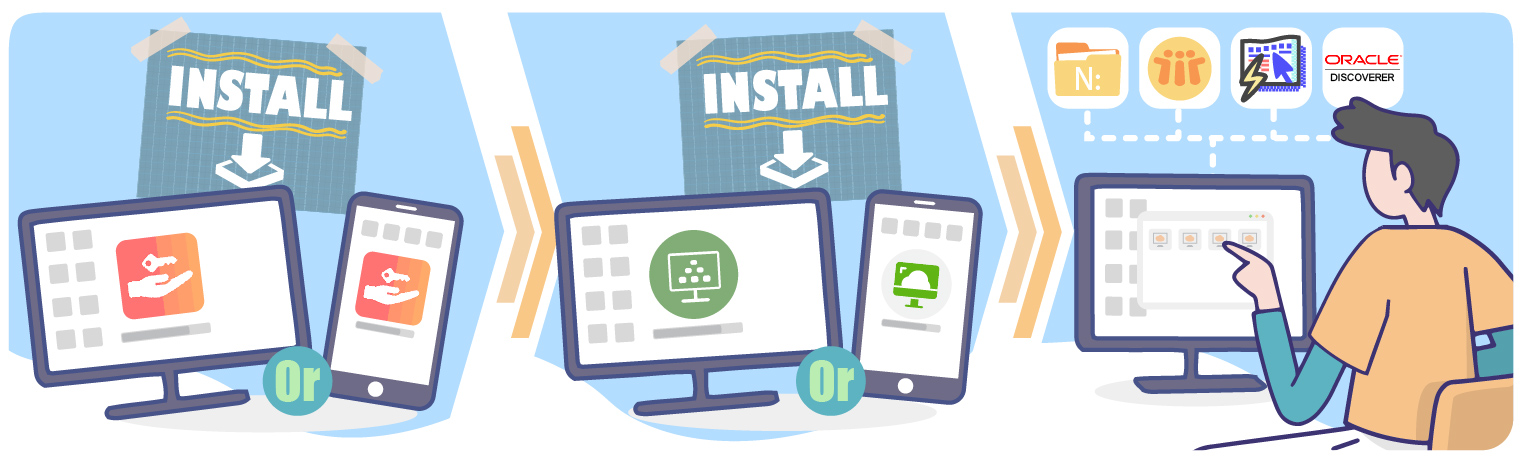
Staff can access Lotus notes and Administrative Information Systems using SSL VPN Client Ivanti Secure Access and VMWare Horizon Client.
- Lotus Notes*, Admin Info. Sys and Oracle Discoverer Plus
Step 1: Download and Setup SSL VPN.
Step 2: Download and Setup VMWare Horizon Client or access via web.
Step 3: Select the Virtual Machines which called “Admin”.
* In order to use Lotus Notes at home, you need to perform one-time setup for copy campus Lotus Notes setting files to Home Directory first.
- Staff Email
Staff can access webmail from any web browser.
Manage UMPASS Account
You can change, recover or manage UMPASS account at https://umpass.um.edu.mo/.
File Access
- Network Drive (N Drive)
Staff can access N drive using SSL VPN Client Ivanti Secure Access and VMWare Horizon Client.
Step 1: Download and Setup SSL VPN.
Step 2: Download and Setup VMWare Horizon Client or access via web.
Step 3: Select the Virtual Machines which called “Admin”.
- UMDrive
You can download and setup UMDrive or access UMDrive via web.
Communication
- Software for IP Phone (Jabber)
Staff can use Jabber as your phone. Please download “Cisco Jabber“. Regarding the features and operations of Jabber client, please refer to the following Quick Reference Guide and FAQ.

- Web Conference
ICTO subscribed Microsoft Teams Meeting and VooV/Tencent Meeting that allows user to hold meeting, interview, oral defense, conference or virtual classroom from their own device (computer, mobile or tablet etc.) simultaneously with up to 300 participants per host.
Licensed Software for Home
- Microsoft Office 365
University of Macau subscribed Microsoft 365 Education. All UM active staff can use several services and features provided by Microsoft, including:
- Office 365 platform
- Microsoft 365 for the web
- OneDrive for Business. Limit size of OneDrive space and recommended only for personal use, with non-sensitive data. Please be reminded to read the Guidelines on Handling Confidential Information.
- Microsoft Teams
- Microsoft 365 Apps for enterprise—including Word, Excel, PowerPoint, and Outlook—can be installed on up to five PCs, five tablets, and five mobile devices. Due to licensing restrictions, access is limited to regular full-time academic or administrative staff only.
- For more services, please refer to the Microsoft website
Eligible Users
- All staff and students
Service Available Hours
- Mon – Sun
24 hours
Service Support Hours
- Mon – Thu
09:00 – 13:00
14:00 – 17:45 - Fri
09:00 – 13:00
14:00 – 17:30
Support / FAQs
- Please visit ICTO Knowledge Base
Contact
- ICTO Help Desk
- Location : Room 2085, 2/F, Central Teaching Building (E5)
- Telephone : 8822 8600
- Email : @